
Translate Jimdo
This Jimdo Website integration guide shows you how to translate Jimdo Websites in a few easy steps. Follow this tutorial to create a multilingual Jimdo Website translated to other languages for your international customers.

Below is a step-by-step guide for integrating Localize into your Jimdo Website.
If you do not have a Localize Project yet, signup here!
1. Edit Your Jimdo Site
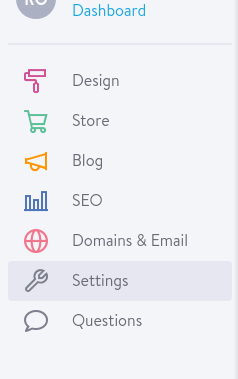
Go to your Jimdo Dashboard. Select your website and click "edit". Then, click “Menu” in the edit page

2. Click "Settings" under the menu.
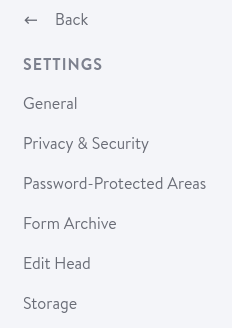
3. Under the Settings menu, select "Edit Head."
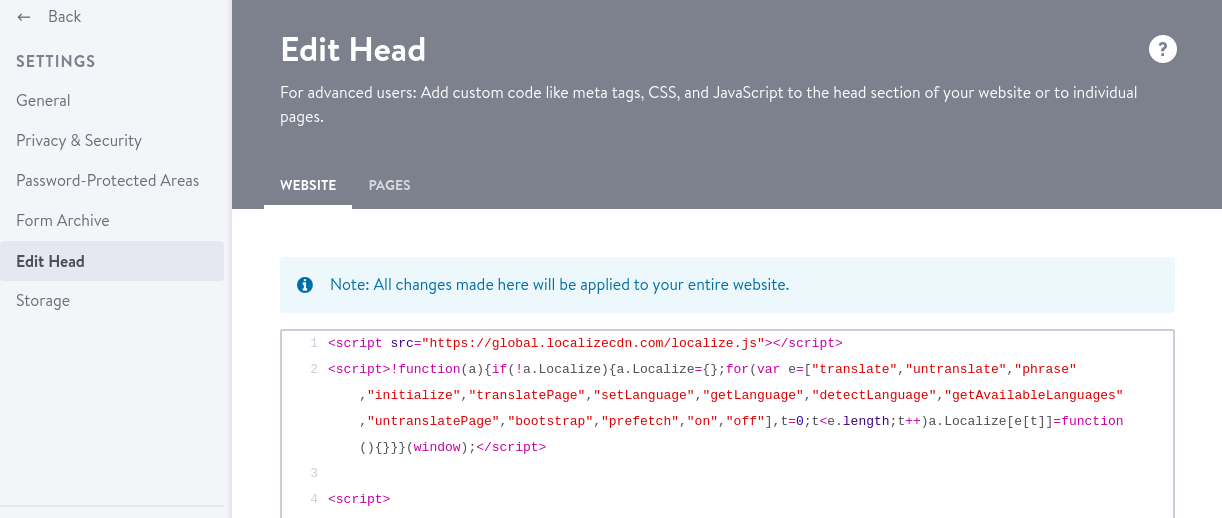
4a. Once in 'Edit Head,' insert the Localize Code Snippet and then hit the "Save" button.
<script src="https://global.localizecdn.com/localize.js"></script>

<script>(function(a){if(!a.Localize){a.Localize={X:[]};var methods=["translate","untranslate","phrase","initialize","translatePage","setLanguage","getLanguage","getSourceLanguage","detectLanguage","getAvailableLanguages","setWidgetLanguages","hideLanguagesInWidget","untranslatePage","bootstrap","prefetch","on","off","hideWidget","showWidget"];for(var i=0;i<methods.length;i++){a.Localize[methods[i]]=(function(m){return function(){a.Localize.X.push([m,arguments]);};})(methods[i]);}}})(window);</script>

<script>
  Localize.initialize({
    key: '[[app:key]]',
    rememberLanguage: true,
    // other options go here, separated by commas
  });
</script>
* Ensure that your Project Key is displayed in between the single quotes next to "key: '????'".
4b. Add Initialization Options
Add any desired options to the Localize.initialize() call above, check here for the full list of possible options.
Some popular options include:
- autoApprove - use to automate your translation workflow fully
- retranslateOnNewPhrases - automatically display translations for known source content
- localizeImages - allows for localization of images in your site
5. Reload your website.
- Visit your website (or application).
- Select one of your target languages using the language-switching widget.
- Refresh the page.
- Lather, rinse, and repeat, for each page on your site.
Localize will automatically begin detecting new content on the pages you visit and bring it into your dashboard.
6. Approve phrases
Then head on over to the Manage Phrases page to approve phrases in the Localize dashboard.

7. Phrases not showing up?
If you are not seeing phrases show up in your Pending bin in the Localize dashboard, follow the troubleshooting instructions here.
Need Help?
Contact support for custom integration help or troubleshooting!
Updated 8 months ago